Most as-built models end up "in a drawer"
The model is handed over and that is where its use ends. Not because the model is bad, but because nobody has the time, money or will to change the way they are used to working.
We do that part for you: we tidy up the data, help you choose the software and train your people to get value from it. Is my model usable?
Why does the model end up in a drawer?
Three things we see in almost every building.
The requirement is there, but the purpose is unclear
A model is required, but it is often unclear what exactly it should achieve. The people who will later work with the model should be involved from the start, and their needs should be heard.
The model is handed over and nobody uses it
The as-built model is finished and handed over to the client. What happens to it next, or what it is used for, honestly nobody knows. Usually it just sits in a folder.
Nobody in the building can open the model
The model comes in a special file that needs a separate program and a bit of practice to open. If nobody in-house has that skill, even the best model goes unused.
What you can really do with an FM model
Six jobs a well-prepared model can do.
In day-to-day management
Room data sheets and equipment list
We bring the data into a consistent form so it can be taken out of the model and analysed. This gives you, for example, room data sheets showing which equipment is in each room.
Equipment and its history
Maintenance work, measurements and warranties can be attached to equipment in the model. The next technician sees straight away what has been done to the equipment, without searching through a separate folder.
The model on your phone
The technician can see on site what is above the ceiling, without having to call anyone or look for a drawing.
In the long term
Repair quantities and budget
If a wall needs painting or a light fitting in a room needs replacing, you get the exact quantities, manufacturers and models straight from the model, with no need to go on site. The budget can be put together from the model data.
Replacing equipment
The model records equipment types and installation dates. This makes it easier and more accurate to plan when what needs replacing and how much money it will take.
Starting material for the next project
When the building is renovated, the existing situation is already in the model. There is no need to order a new survey.
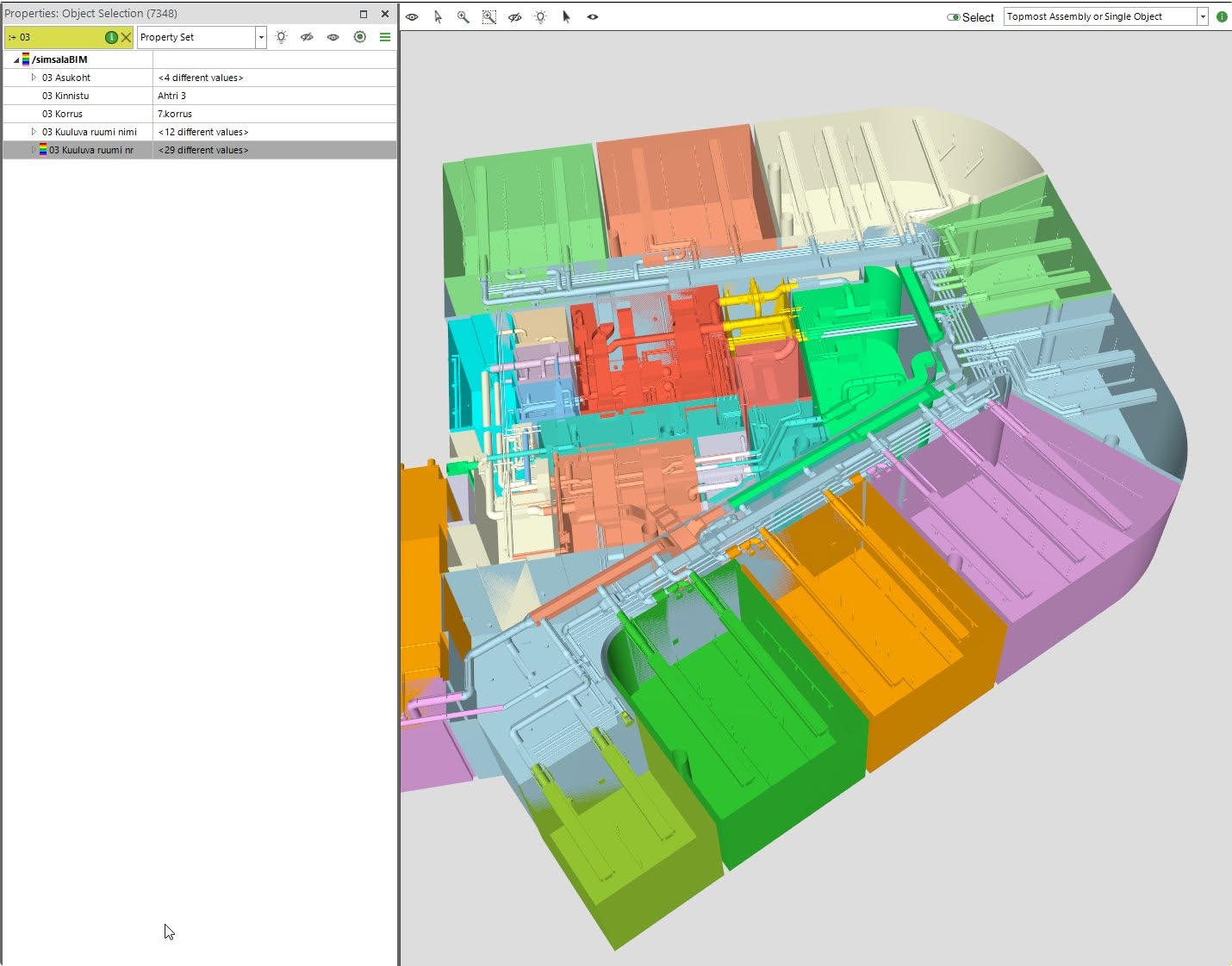
This is what a well-prepared model looks like
One floor, each colour is a separate room. Every piece of equipment in the model knows which room it is in, so you can take out an equipment list by room, by floor or for the whole building.
A well-prepared model reaches day-to-day facility management
For operations there is tarcus FM: a solution for property managers, maintenance technicians and building owners. Equipment goes from the FM model into the register together with its maintenance tasks, and product information and manuals open from each piece of equipment.
- Equipment register from the model or via Excel
- Maintenance plans and work orders on the technician's phone
- Equipment, maintenance and budget in one place
Four steps to a working FM model
What you gain
Is your model ready for facility management?
Questions that always come up
Interested in using BIM in facility management?
Get in touch and let's talk about how we can help. Tarcon has worked for years on as-built models and BIM coordination for buildings in Estonia. Write to us and we will usually reply within the next working day.